


Nipto: Split Household Chores
4.5165.00 Reviews
App Specs
- Version
- 2.15.1
- Updated On
- License
- Free
- Downloads
- 500,000+
- Developer
- Nipto
- Categories
- House & Home
- Platform
- Android, iOS
Screenshots
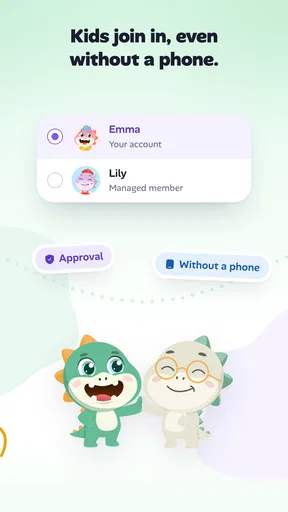
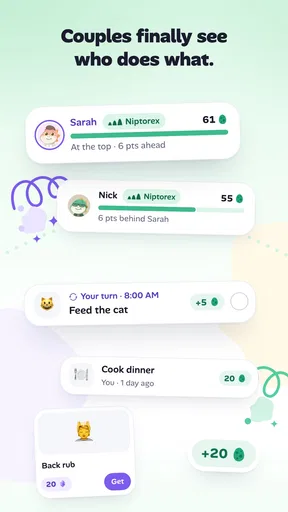
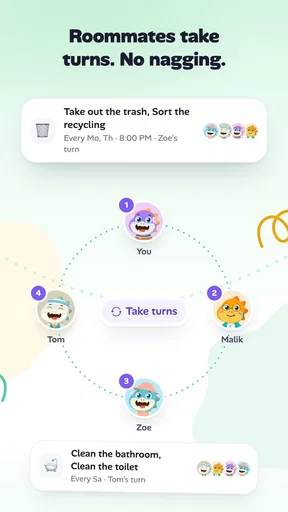
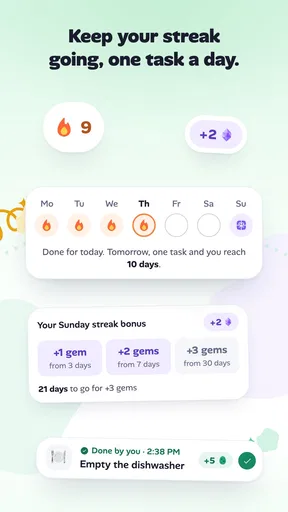
 Analysis by AppCompare
When a household task keeps getting postponed, the problem is often less about cleaning than about remembering, dividing, and agreeing on what “done” means. I’m interested in tools that can make those small negotiations easier without turning home life into another full-time management project. Nipto: Split Household Chores takes a playful approach: it gives household tasks a shared place and adds a game-like reason to tackle them. That can help when chores are a regular source of friction, though it works best when everyone is comfortable with visible progress and a little friendly competition.
Trust starts with realistic expectations
Nipto is a free household app from Nipto, with optional in-app purchases priced from $1.99 to $18.99 per item. Its audience is broad: the content rating is Everyone, and the app has reached over 500,000 installs. Those figures suggest that it is established enough to be familiar to many households, but they do not tell me whether it will suit every family’s habits. I’d judge it by the way its shared task system fits the people who will actually use it.
The practical trust question is not whether an app promises to make a home harmonious; no chore tracker can guarantee that. It is whether the household can agree on the rules before the points become a source of argument. I’d start with a handful of clearly defined jobs and check that everyone understands how they are assigned and recorded. A short trial is more useful than building a perfect schedule on day one.
Making a shared chore system work at home
I’d use the first week to agree on a small set of chores and what counts as finishing each one, rather than trying to map every household task at once. That keeps the shared system easy to check and makes it clearer whether the routine is helping or merely adding another thing to manage. Once those ground rules feel fair, the next question is how each person will take part.
Getting Started with Nipto
First things first, downloading the Nipto app was a breeze. It’s available on both Android and iOS, so no matter what your device of choice is, you’re covered. Once installed, I was greeted with a clean, user-friendly interface. No clutter, just simplicity. And in our fast-paced world, that’s a win in itself.
The setup process was intuitive. I was able to create a group for my household in just a few taps. Adding family members or roommates? Easy peasy. All they needed was the app on their phones, and an invite from me. Within minutes, we were all connected and ready to delegate chores like pros.
That shared setup is useful when everyone can check the same routine instead of relying on one person to send reminders. Still, I’d treat the initial setup as a household conversation, not simply an organizer’s job. Agree on which tasks count, how often they should happen, and whether a task belongs to one person or can be claimed by anyone. Those choices matter more than the size of the task list, because unclear expectations are exactly what a tracker cannot resolve on its own.
Worth Reading Before You Choose

Flipboard Shows What News Apps Must Do Beyond the Feed

Switching to Android Auto Means Rethinking Your Driving Routine

Google Calendar Makes a Crowded Week Easier to Manage

Ludo King Makes the Most of the Minutes Between Plans

Baby Panda World Brings Quick Play to Modern Phones, but Its Game Library Feels Busy

ESPN’s Live Game View Makes Following Close Games Easier
A Game-Changing Approach to Chores
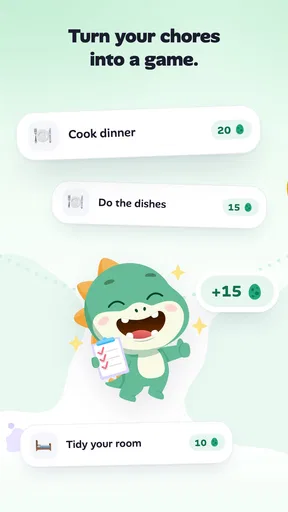
Now, here’s where Nipto really shines. The app gamifies chores. Yep, you heard that right. Each household task you complete earns you points. It’s like turning your to-do list into a friendly competition. I noticed a shift in motivation almost instantly. Suddenly, everyone was eager to grab the vacuum or do the dishes just to rack up those points.
Tasks are assigned with ease. You can either distribute them manually or let the app do the heavy lifting for you. I opted for the latter, and it was like magic. No more arguments over who did what last week. The app keeps track of everything, ensuring a fair and balanced workload.
Automatic assignment is a convenient starting point, but I wouldn’t assume that an even-looking rotation always feels fair. One person may have less time at home, while another may already take care of jobs that are easy to overlook. If that sounds like your household, use manual assignment to reflect those realities rather than treating the points as a perfect measure of effort. The useful question is whether the system starts a fair conversation, not whether it can settle every disagreement by itself.
A realistic way to test the setup is to follow an ordinary week. On a busy evening, one person can check what is due, another can pick up a task that fits their schedule, and the household can see what has already been handled rather than asking around. If a job repeatedly gets skipped, the record can help reveal whether it is assigned too often, poorly timed, or simply defined too vaguely. That is a more helpful use of tracking than watching the leaderboard for its own sake.
Features That Make a Difference
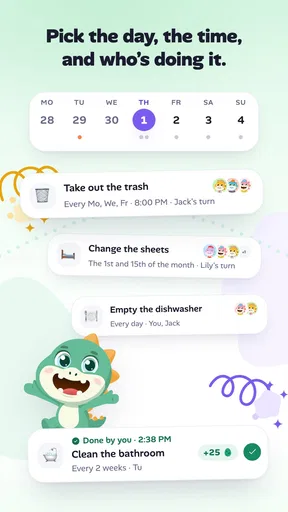
Beyond gamification, Nipto offers a slew of features that make managing chores a breeze. For instance, the task calendar is a lifesaver. It provides a clear visual of who’s doing what and when. This way, there are no surprises or missed tasks.
Another feature I loved was the ability to customize tasks. Whether it’s a daily, weekly, or monthly chore, you can adjust the frequency as needed. Plus, the app sends gentle reminders, so no one forgets their responsibilities. It’s like having a personal assistant who never takes a day off.
For a less obvious but useful workflow, I’d avoid adding every tiny household action as a separate task. Start with recurring jobs that cause genuine confusion—taking out rubbish, cleaning shared spaces, or handling a regular kitchen reset—and give each one a clear interval. A long list can make the calendar look busy without making the home feel more organized. Once a routine works, add occasional jobs only if the household needs a visible prompt for them.
The calendar is also most useful when it supports flexibility rather than becoming a rigid appointment book. A weekly task may need to move because someone is away or a room is already clean. I’d treat reminders as nudges to check the plan, not as proof that a person has failed. If a household finds frequent alerts irritating, keeping the task list focused and agreeing on when to check it can make the system feel less intrusive.
Keeping Everyone Accountable
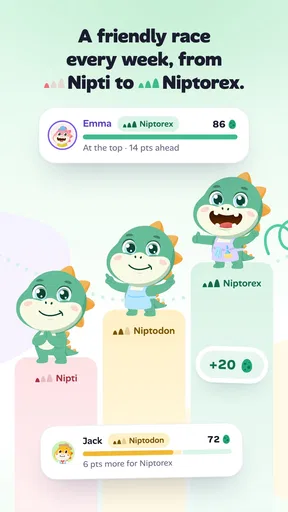
One of the unexpected perks of using Nipto was how it enhanced accountability. With everyone’s progress visible, there’s a sense of transparency that’s incredibly effective. It’s not just about doing chores; it’s about being part of a team striving towards a common goal.
And let’s be real, seeing your name on top of the leaderboard is pretty satisfying. It’s a small win, but a win nonetheless. It’s these little victories that keep the motivation high.
That visibility is a strength for people who enjoy seeing progress, but it is also the feature I’d think about most carefully before inviting everyone. A leaderboard can make routine effort feel rewarding in one home and competitive or embarrassing in another. If a child, partner, or roommate dislikes public comparisons, agree on how the group will use the scores before relying on them as a measure of contribution. The app can show recorded tasks; it cannot account for every helpful thing someone does outside the list.
This is where Nipto differs from a paper checklist or a plain shared notes app. A checklist is quieter and gives people more freedom to interpret it, while a calendar alone is often better for scheduling than for motivation. Nipto’s distinct appeal is putting shared chores and points together. That combination is a good fit for households that want visible participation, but a neutral list may be better if the goal is simply to remember jobs without ranking anyone.
Choices, privacy, and day-to-day control
Because household use involves several people, I’d be deliberate about what goes into the group. Chore names and completion records can reveal routines—for example, when a household tends to do certain jobs—so I’d keep entries practical and avoid putting sensitive personal details into task descriptions. That is a sensible habit for any shared home organizer, especially when members have different expectations about what should be visible to others.
I also wouldn’t treat an invite as a minor step. Before bringing in relatives or roommates, explain what the group is for and what everyone will see in the shared chore flow. That gives each person a chance to decide whether the points and visible progress suit them. If someone would rather not participate, a paper schedule or a simple household conversation may be more comfortable than pressuring them to join an app.
On the device side, the stated minimum operating system is Android 7.0, and the current version is 2.9.29. I’d check compatibility before making Nipto the only place where a household’s routine lives. For anyone comparing costs, the app is free to start, while optional purchases range from $1.99 to $18.99 per item; I’d first see whether the free experience meets the household’s needs rather than assuming paid extras are necessary.
Who will enjoy it—and who may not
I’d recommend Nipto most readily to couples, families, or roommates who already agree that chores should be shared but need a clearer way to keep track. It can be especially helpful when responsibilities rotate, when one person tends to carry the mental load of reminding everyone, or when younger household members respond better to a sense of progress than to repeated verbal prompts. The key is that members are willing to check in and accept a shared record.
I’d be more cautious if the household has serious conflict about fairness, if people have very different schedules, or if someone sees points as judgment rather than play. In those cases, discuss the division first and use the app only after the expectations are settled. It is also not the best choice for someone who wants a private personal checklist, a detailed home-maintenance planner, or a system with no competitive element. A calendar, a paper rota, or a basic shared note may be simpler for those needs.
Before committing, a few practical questions are worth answering together: Can tasks be adjusted when schedules change? Are reminders helpful or bothersome? Does everyone want their progress visible? Is the household comfortable with the optional purchase model? Those are not reasons to avoid trying it; they are the kinds of choices that determine whether a shared chore app reduces friction or adds another thing to negotiate.
Wrapping It Up
After a few weeks of using Nipto: Split Household Chores, I can genuinely say it’s been a game-changer for my household. It’s not just an app; it’s a tool that fosters cooperation and makes managing chores less of a burden. If you’re looking to bring some order to your home and maybe even have a little fun along the way, give Nipto a shot. Trust me, you won’t be disappointed.
So, whether you’re living with family, friends, or roommates, Nipto might just be the key to turning chore day into something you actually look forward to. Who knew cleaning could be so rewarding?
My cautious verdict is that Nipto is worth trying when a household wants a shared routine with a playful push, not a referee that decides who contributes enough. Its average rating is 4.7 from around 6,300 ratings, alongside 155 written reviews, and it was released on May 25, 2020. Those figures offer some context for its reach and history, but the deciding factor for me is simpler: will everyone use the system in good faith? If yes, its mix of task planning, reminders, and points can make ordinary chores easier to coordinate. If not, a low-tech rota may keep the peace better.
Pros
- User-friendly interface for easy navigation.
- Customizable chore assignments for flexibility.
- Syncs across devices for team coordination.
- Gamified elements make chores fun.
- Notifications keep tasks on schedule.
Cons
- Limited features in the free version.
- Requires internet for syncing tasks.
- No option for offline task tracking.
- Some users report occasional app glitches.
- No integration with smart home devices.
FAQs for Nipto: Split Household Chores
What is Nipto: Split Household Chores and how does it work?
Nipto is a chore management app designed to help households efficiently split and track household chores. It allows users to assign tasks, set deadlines, and track completion. Each member can see their responsibilities and earn points for completed tasks, making chore management more organized and motivating.
Is Nipto suitable for families of all sizes?
Yes, Nipto is designed to accommodate families of all sizes, from small households to larger ones. The app allows for multiple user profiles, so each family member can have their own account to manage and track their assigned chores, ensuring everyone stays on the same page.
Does Nipto offer any customization options for chore assignments?
Nipto provides flexibility in chore assignments, allowing users to customize tasks according to their household needs. You can create recurring chores, set specific deadlines, and assign tasks based on individual preferences or rotational schedules, ensuring fair distribution and adaptability to various routines.
Can Nipto integrate with other apps or devices?
Currently, Nipto focuses on providing a streamlined experience within its own platform. While it doesn't offer direct integration with other apps or devices, it is compatible with both Android and iOS, making it accessible on most smartphones and tablets for easy management on the go.
Is there a cost associated with using Nipto, and are there any in-app purchases?
Nipto is available for free, with basic features accessible to all users. However, it also offers a premium version with additional features like advanced reporting and customization options. In-app purchases are available for those who wish to enhance their chore management experience with these premium tools.


